This Blog Is Officially Closed

This Blog Is Officially Closed
The Blog Author Is Start A New Blog With Her Own Server.Click On Above Image To View Her New Blog (Or) Go To This URL -- www.Techwales.com
Showing posts with label Detailed Content. Show all posts

Tuesday, 12 July 2011

CPU Speed & Hardware Info

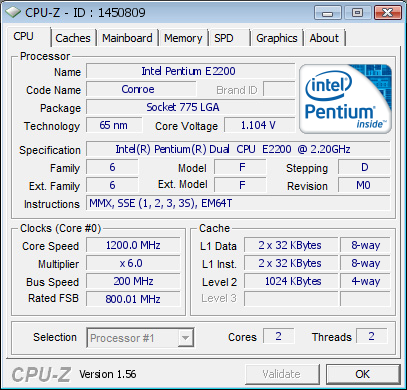
 If you are curious that what is my CPU brand and it's speed (and some other hardwares info) you are in right place! I want to share my CPU information with you. Check the following screenshot taken from CPU-Z.


Here is complete information, check it out!
One thing that you should know, the speed 1200.00 MHz in the picture, it's not the actual speed! When the CPU is overload the speed rise and goes to 2200.10 MHz, and when it's idle it falls to 1200.00 MHz and use one core.

Validate your hardware configuration with CPU-Z Validator!
What about a valid CPU-Z certification of your latest overclock performance or brand new processor?


Having the best graphic card in the world or oven the most clocked CPU is pretty cool ... but it gets even cooler if your friends can see (and get jealous about) it!
 

If you are interested, share your CPU information with us. Download CPU-Z and click on "Validate" button and submit your CPU and you will have a page like THIS! share that page link in the comment.


Regards,
Lazy Goys Blog

Sunday, 10 July 2011

Chat With Strangers! Amaging Chat


Chatting with someone is a part of human nature, if you scientifically describe; it is a medium for communication but everything is entertainment.


A day I was searching something on Google, I see a sponsored link about chatting with strangers, I followed that. I had to have webcam to chat on that site. The website has three chatting options:
1. Chat random: means chat with anyone randomly
2. Chat with a man as a man
3. Chat with girls.


This kind of site was new for me. I started searching for this I find many of new sites with same features and may be using same technology. Some sites need webcam and some with text or video options, and some only with text. I tried almost 25 sites and find chatting with strangers is nonsense idea. Unfortunately I can't mention all the sites here because of my blog’s nature.


The only problem with some of the sites is you will find yourself in embarrassing environment. There is only one benefit of these sites; you do not have to download or install anything because it is online. You will start chatting with a random users in moments.


Omegle
This is a simple but popular site for chatting anonymously, to start chatting just select text of video, this option is useful if you do not have webcam.


Lollichat
It is a small site, you will find many sites similar to this one. This is only for webcam users.


Dontalk
Dontalk is available for Facebook, iPhone, iPad, Palm pre, Blackberry and Android as an app. Chatting is simple choose a boy or girl, your language and location (optional).


Facebuzz
Facebuzz is a new site I think, I saw AdSense ads running for this site. You must need webcam.


Tinychat
You must be logged in to leave a comment. I like this site. Aston Kutcher recently invested in this site.


Tohla
Tohla is only for text chatting at this time. It is text chat only site so there are more chances to meet someone to chat.


Chatroulette
Chatroulette is a popular site, you will find many clones of this site. A small window you will see, you have options to use web cam or no.


Funkmaster
It is a very small site in popularity. While chatting you can share videos and pictures.


AnybodyOutThere
Site developers are working on this site to make your experience better. You need to be logged in to start chatting.


Camstumble
It allows you to chat with strangers with sign up but for better experience you need to logged in.


iMeetzu
To start chatting video or text chat, after choose your name, gender and your location


Woome
Woome is a dating site. I read post on TechCrunch on this website, it asks you to get VIP account. When you signup for this site you will see some messages in inbox but to read them you have to upgrade. But shufflepeople section is for random chat, however I could not find any people to chat.


Chathopper
It is I think a nice site find strangers but you should not be looking very strange.


Misham
It is a text chat site. Small site so no fun!


Jabbercam
It is also a good site if you are really looking for strangers. In you text area you will see advertisement for other websites. It is a chatroulette script that you can purchase and start your own chatting site.


Tworl
It is a random chat site but not 100% random you need to sign up, every time you search for some to chat you will be connected to a random match immediately. You both have 48 hours to add as friend or not.


Faceflow
You will see most of the websites are similar to this one, the only difference is you have to login before start a chat. If you are logged in you have many benefits.


Kismetchat
It is a little similar to TinyChat, you will see 9 random users on-screen, in right sidebar you see their names, you can click any name to chat with him or her.

Extra
Well, here are some other websites for Online chatting. Give them a try!
http://www.free-dating-asia.com
http://www.wireclub.com
http://chat.oneindia.in
http://www.planetlivechat.com
http://www.chatting.com
http://www.javachatrooms.net
http://www.paltalk.com
http://www.teenchat.com
http://www.chatbazaar.com
http://www.chat-avenue.com
http://www.ukchatterbox.co.uk
http://f2mchat.com
http://www.chitchatting.com
http://www.chatcache.com
http://www.chatcamcity.com
http://www.chat-rooms-online.com
http://www.ichatfilipina.com
http://www.spinchat.com
http://www.teenssite.co.uk
http://www.talkcity.com
http://www.usachatnow.com
http://www.byfchat.com
http://xat.com
http://www.coolwebchat.com

Regards,
Lazy Goys Blog

Full List of Country Calling Codes + Download

This is a list of country calling codes defined by ITU-T recommendations E.123 and E.164, also called IDD(International Direct Dialling) or ISD (International Subscriber Dialling) codes.

The telephone numbering plan for a telephone system includes an international dialing prefix, such as "00" or "011", which is added before the country calling code and is specific to the country from which the caller is dialling. Generally, as in the list below, the need for this prefix is indicated with a "+".


A 
Abkhazia +7 840, +7 940, +995 44
Afghanistan +93
Albania +355
Algeria +213
American Samoa +1 684
ANAC Satellite +857, +858
Andorra +376
Angola +244
Anguilla +1 264
Antigua and Barbuda +1 268
Argentina +54
Armenia +374
Aruba +297
Ascension +247
Australia +61
Australian External Territories +672
Austria +43
Azerbaijan +994

Thursday, 7 July 2011

Firefox 5 release: new speed, same illness (quick review)

Firefox 5! Yes! You maybe surprised, but Firefox 5 has been rolled out to Kubuntu! Even official site still offers Firefox 4.0.1!
I am not fan of Firefox, but new version... why not look at it?
First attempt to start Firefox 5 was taken right after update installation. Unfortunately, it failed. I suppose there were too many changes in other software (kernel, KDE) to handle them 
all.

Wednesday, 29 June 2011

21 Interesting Facts About Google.com

Google is everyone favorite search engine and I’m not sure how many of you really know history behind Google. Here are some interesting facts about Google search engine, which you would love to know.
Google search engine 21 Interesting facts about Google
  • Google started in January, 1996 as a research project at Stanford University, by Ph.D. candidates Larry Page and Sergey Brin when they were 24 years old and 23 years old respectively.
  • Googol is a mathematical term 1 followed by one hundred zeroes. The term was coined by Milton Sirotta, nephew of American mathematician Edward Kasne.
  • The name Google™ was an accident. A spelling mistake made by the original founders who thought they were going for ˜Googol™”.
  • Google consists of over 450,000 servers,  racked up in clusters located in data centers around the world.
  • When Serge Brin and Larry Page were born, Bill Gates had a nervous breakdown.
  • Atlantis, Shakespeare’s unknown diaries and Mozart’s unreleased album were found using Google.
  • The infamous “I’m feeling lucky” button is nearly never used. However, in trials it was found that removing it would somehow reduce the Google experience. Users wanted it kept. It was a comfort button.
  • Google translates billions of HTML web pages into a display format for WAP and i-mode phones and wireless handled devices.
  • 57% of American kids say ‘Google’ as their first word.
  • 620 million visitors visit Google.com daily.
  • 97% of Google Revenue comes from their advertising services.
  • Google processes 20 Petabyte of information daily.
  • As of December 2009, Google’s assets were valued at $40.5 billion.
  • Google has a world-class staff of more than 2,668 employees known as Googlers. The company headquarters is called the Googleplex.
  • Google’s index of web pages is the largest in the world, comprising of billions of web pages. Google searches this immense collection of web pages often in less than half a second.
  • All the letters used in the ‘Google’ word are copyrighted by Google. According to forecasts, Google will buy rights for other letters soon (which made Chinese and Japanese very happy). The company name won’t change, though.
  • When Google started it indexed 25,000 web pages. Today Google indexes billions of web pages and each time it grows by 10-25%.
  • According to Google “As the web grows search becomes more and more important”. It acts like a library , the bigger the library the more important is the index.
  • The biggest break in search came when Google introduced their improved spell checker seen as “Did you mean ? ”.This feature doubled their traffic and soon the developers discovered that the ideal placement was at the bottom of the search results.
  • Every now and then Google makes small changes and test them with a given set of users. The users aren’t told of this. They are presented with a new interface and the testers observe how the users react to it.
  • There isn’t any restriction for proper dress code in the Google office. This may include pajamas and even super hero costumes.

Saturday, 25 June 2011

Know About The Blogger Limits


Here is some information about the limits a Blogger account has. I’ve put them into a list for your reference. I’m sure this information will come in handy at some point in your blogging future. So you might want to bookmark this post, just in case.

Account limits- Number of blogs: 100 per account.
- Profile "About Me" info length: 1,200 characters.
- Profile Interests and Favorites: 2,000 characters in each field.
- Number of blogs to follow: 300 blogs per account.
- Size (dimension) of an image: 1600px wide. Larger image will be scaled down (preserving aspect ratio)
- Filesize of an image: No limit. 250KB through Blogger Mobile.
- Capacity of image hosting (on Blogger partner Picasa Web Albums): 1024MB (1 GB) per account.
- Bandwidth of image hosting: No limit!


Blog limits
- Length of blog title: 90 characters. 
- Length of subdomain name (as in http://SUBDOMAIN.blogspot.com): 37 characters. 
- Length of blog description: 500 characters. 
- Number of members: 100 member invitations per blog. 
- Number of readers (for Private blogs): 100 per blog. 
- Number of posts: No limit. (However, currently the Edit posts list maxes out at 5000 posts, which could make some older posts inaccessible for editing. Blogger is working on a fix). 
- Number of posts displayed on multiple-post pages (homepage, archive etc.): 
- Blogger will attempt to display the number of posts as set in Settings > Formatting > Show At Most provided the posts’ file size does not exceed the Blogger auto-pagination file size cap. 
- Bigger posts may cause fewer number of posts to be displayed. 
- Number of static pages: 10 per blog. (currently I have 8 pages; softwares, keygens, patches, ...
- Number of labels: 5000 unique labels per blog. 


Post limits
- Length of post: No limit. 
- Size of post: No limit. 
- Number of labels: 20 unique labels per post. 
- Number of comments: No limit. 
- Length of post filename: 39 characters (auto-generated from post title, truncated to length). 


Other limits
- Label length: 200 characters per label. 
- Comment length: 4,096 characters per comment. 

Wednesday, 22 June 2011

Open Office.Org Software:Details And Uses


OpenOffice-Org
If you are like me and believe in Open Source software rather than Paid or License version than this software you must know. we all uses MS Office for our office or home use and whatever may be the reason if some one told us to create a PowerPoint Presentation or to create a Document we just click on Ms PowerPoint or Ms Word and create it.but if you want to use Microsoft Product you will have to buy it and this is the major problem, some one searches for torrents, some for Keygen and all.ya i know its a daily practice who is newbie to the world of computers.

But friends there is another software is available to compete the MS Office software and its known as “OpenOffice.org”  don't take me wrong i am not telling you not to use MS Office, it always preferable but i am just providing you the alternative.we should have some alternate option that will help us to gain and learn more.
>

What The Developer Says :

OpenOffice.org is the leading open-source office software suite for word processing, spreadsheets, presentations, graphics, databases and more. It is available in many languages and works on all common computers. It stores all your data in an international open standard format and can also read and write files from other common office software packages. It can be downloaded and used completely free of charge for any purpose.

Some Features Of OpenOffice :

Great Software :
This software is a result of 20 years hard working job and software engineering. it was designed as a single software but eventually developed in to well formed software.it has an excellent consistency that other software can not match.its a completely open source so software so any one can report bug, request for some new features and much more.
  • Better By Design.
  • Better For You.
  • Honest Software.
Easy To Use :
As you all are using some or other office software and you are familiar on how to use so in using this software you will not find any difficulty and can work effectively.if you have file from other office package you can open them in this with no difficulty.
  • Use It Immediately.
  • No Need To Retype.
  • Part Of Community.
And its FREE :
The master stroke is that this software and this much tools are available to you at no cost i.e. FREE of COST.its released under LGPL license. 
  • Free Of Charge.
  • Freedom From Worry.
  • They Value Your Freedom.

Conclusion :

You must have this software and you can get all this things for free.if not than at least give one try to it.

Official Download Link

Friday, 17 June 2011

Keep Your Files Under You


Learn About Linux

The official Websites For Telling About Linux
http://linuxaffinity.comhttp://linux.org/lessons
http://education-portal.com/articles...es_Online.html (VIDEO TUT)http://www.softwaretrainingtutorials...nux-choice.php (VIDEO TUT)

Know about your VLC Player and its Powers

For most people, VLC is the favorite media player because it plays everything they throw at it without hiccups. No hunting for codec. But VLC can do a lot of other things as well. Find out how many of these listed below you knew, and how many you did not.

1. Rip DVDs: VLC includes a basic DVD ripper. You probably would never use it when there are better DVD rippers available, but it helps to know that you can in fact, get a decent quality DVD rip with VLC. To rip a movie follow these steps: Go to the Media menu and choose Convert/Save. Click on the Disc tab.

* Here you can adjust the Starting Position and rip only specific titles or chapters.

* Enter file name making sure to end with .MPG, and start ripping.
Click On Read More To Continue Reading

* Click Save.
2. Record videos: With the new VLC, you can record videos during playback. The record button is hidden by default. To see it, click on View>Advanced Control. The record button will now appear. Clicking on the button while playing a movie or video will start recording. Clicking again will stop recording.
3. Play RAR files: Do you know VLC can play videos zipped inside RAR files? They play like normal video files and you can even use the seek bar. If the RAR file is split into several files, no problem. Just load the first part (.part001.rar ) and it will automatically take the rest of the parts and play the whole file.
4. Play in ASCII mode: VLC media player has an amusing ability, to playback movies in ASCII art. To enable ASCII mode, open VLC media player and click on Tools>Preferences. Open the section “Video” section and under “Output” select “Color ASCII art video output” from the drop down menu. Save it. Now play any video file to enjoy the ASCII art.
5. Listen to online radio: VLC includes hundreds of Shoutcast radio stations. You just need to enable it through Media>Services Discovery>Shoutcast radio listings. Now, open the Playlist and browse through the stations.
6. Convert Audio and Video formats: In VLC you can convert video and audio files from one format to another. Several different formats are supported like MP4, WMV, AVI, OGG, MP3 etc. To access the converter:

* Go to Media>Convert/Save.

* Load the file you want to convert using the Add button and click Convert.

* Now choose the output format and output file location.

7. Download YouTube and other online videos: First grab the URL of the YouTube video page. Now click on Media>Open Network stream. Paste the URL and click Play.

Once VLC starts streaming the video, click Tools>Codec Information and at the bottom of the window you will see a Location box. Copy the URL and paste it on your browser’s address bar. The browser will now download the file which you can save it to your hard disk. Alternatively, you can record the video.

Wednesday, 15 June 2011

Know 10 reasons why PCs crash

10 reasons why PCs crash U must Know

Fatal error: the system has become unstable or is busy," it says. "Enter to return to Windows or press Control-Alt-Delete to restart your computer. If you do this you will lose any unsaved information in all open applications."

You have just been struck by the Blue Screen of Death. Anyone who uses Mcft Windows will be familiar with this. What can you do? More importantly, how can you prevent it happening?
Click On Read More To Continue Reading

Monday, 13 June 2011

Torrent Trackers ! Speedup Your Torrent !

You To Spped Up Torrent Downloading Speed
There Is a Answer For This Question.
The Answer Is Torrent Trackers!


Know about Torrent Trackers And Increase The
Downloading Speed Of Your Torrent!
Click On Read More To Continue


Have you ever wondered how much faster you could make your PC? Here are eight techniques that computer speed freaks use to squeeze every ounce of performance out of their systems.

Increase The Speed Of Mozilla Firefox With 8 Tips


Firefox has been outperforming IE in every department for years, and version 3 is speedier than ever.

But tweak the right settings and you could make it faster still, more than doubling your speed in some situations, all for about five minutes work and for the cost of precisely nothing at all. Here's what you need to do.

Tuesday, 7 June 2011

Details About Virus, Trojan, Worm

Q: What is the difference between a Virus, Trojan, and Worm?
A: Basically, they all fall under the generally category of "viruses". However, there are a few distinctions.
Virus - Technically, a virus infects another file (attaches or inserts itself into it). They usually infect program files or MS Office documents. From there, it can replicate, do damage, etc. Unlike a worm, these do not function as a stand alone (except possibly to infect a given file).

Worm - This is almost identical to a "true virus", except that it lives on its own and generally doesn't infect other files (although it can replace them). Usually, these copy themselves using e-mail, networks, disks, etc. Again, these are very close to a true virus, and can do the same kind of damage.
Trojan Horse - This type of program doesn't copy itself but does do damage to your computer. These types of programs rely on people to pass them around and to run them. They do not e-mail themselves. The idea is to make the program look like it's something harmless, like a screen saver or joke, so it gets sent around.
Related Posts Plugin for WordPress, Blogger...